A slider that runs from 0 to 100 has no memory and no resistance: it looks the same whether it represents aperture, grain, or volume. A real aperture ring clicks into fixed stops you can feel with your thumb in the dark. That difference, resistance versus no resistance, is most of what separates software that feels like a tool from software that feels like a spreadsheet.
The Flat Slider Problem
Most digital camera apps inherited their control scheme from generic mobile UI kits, not from cameras. A horizontal bar with a draggable dot maps cleanly onto any continuous value: brightness, saturation, a filter's "intensity," it doesn't matter which. That flexibility is exactly the problem. A slider carries no information about what a good value looks like for the parameter it controls. Move it 40% of the way and you have no idea if that corresponds to a subtle effect or an extreme one, because the mapping between finger position and visual result is invisible until you look at the preview and adjust by trial and error.
Real camera controls are the opposite of general-purpose. An aperture ring only has as many positions as the lens supports, f/1.4, f/2, f/2.8, f/4, and so on, spaced unevenly because each full stop halves the light reaching the film regardless of the numeric gap between values. An ISO dial has a similarly fixed set of positions tied to actual film speeds you'd load into the camera: 100, 200, 400, 800, 1600. Neither control pretends to offer infinite continuous adjustment, because the underlying physical quantity doesn't work that way, and neither should the interface pretend otherwise.
When RfCamera models a specific camera body, its exposure and stock controls are built as discrete, labeled positions rather than a slider disguised as a dial. You rotate to a stop, not to an arbitrary percentage. This matters beyond aesthetics: once you've used the app for a few sessions, your thumb learns where f/2.8 sits relative to f/5.6 on a given dial, the same way it would on a physical lens barrel, and you stop needing to watch the screen to make the adjustment. A flat slider never builds that memory because every session starts the position calculation from scratch, with no fixed reference points for your hand to learn.
Why Mechanical Cameras Have Click Stops
The click stops on a real aperture ring aren't a stylistic flourish, they come from a specific mechanism: a spring-loaded ball bearing riding inside the ring's rotating collar drops into a series of machined notches cut at each full or third-stop position. When the ball seats into a notch, you feel a distinct, small resistance-then-release, which is the tactile signal that you've landed on an exact, named aperture value rather than somewhere between two values. This lets a photographer set exposure by feel, without taking their eye off the viewfinder, which matters most in exactly the situations where you can't afford to look down: a fast-moving subject, a scene changing light quickly, a manual rangefinder where your eye is already occupied aligning a focus patch.
Shutter speed dials on mechanical cameras work on the same principle, with detents at the classic doubling sequence: 1/30, 1/60, 1/125, 1/250, 1/500. Each step doubles or halves the exposure time, and each has its own click, distinct enough that an experienced shooter can count clicks by feel to jump two or three stops without looking. Focus rings, by contrast, are usually undamped or lightly damped rather than detented, because focus distance is genuinely continuous rather than falling into a small number of meaningful, named positions.
RfCamera's on-screen controls translate this distinction rather than flattening it. Exposure-related dials snap to the same fixed, named positions a physical ring would have, because those are the values that carry real photographic meaning. A rotational gesture on the aperture control moves between actual stop values, with a UI-level snap that mimics the ball-and-notch resistance, not a smooth drag that could land you on f/3.1, a value no real lens on any of the twelve simulated bodies would ever produce. Building the interaction around the same discrete steps the mechanism actually has, instead of the continuous scale a touchscreen makes technically possible, is what keeps the control legible.
A Viewfinder Is an Interface, Not a Preview Window
A rangefinder viewfinder doesn't show you one image, it shows you two, overlaid. Light enters through a small window near the viewfinder eyepiece and, separately, through a second window offset a few centimeters away, and a pivoting mirror inside the body shifts the second image sideways as you turn the focus ring. When the two images align into one, the subject is in focus, a purely optical measurement with no autofocus sensor or algorithm involved. This is why classic Leica M-series bodies and their contemporaries put the rangefinder patch at the center of the frame: it's not a focus indicator overlaid on the scene, it is the mechanism of focusing itself, and getting it right requires the same deliberate, manual alignment every time, with no assist.
That's a fundamentally different relationship to the frame than tapping a focus box on a phone screen and letting a contrast-detection algorithm settle on a subject for you. The rangefinder forces you to look, decide what you're focusing on, and confirm it before the shutter can capture a sharp result, which is part of why rangefinder photography reads as more deliberate: the interface makes carelessness harder, not through a warning message but through the physical act you have to complete correctly.
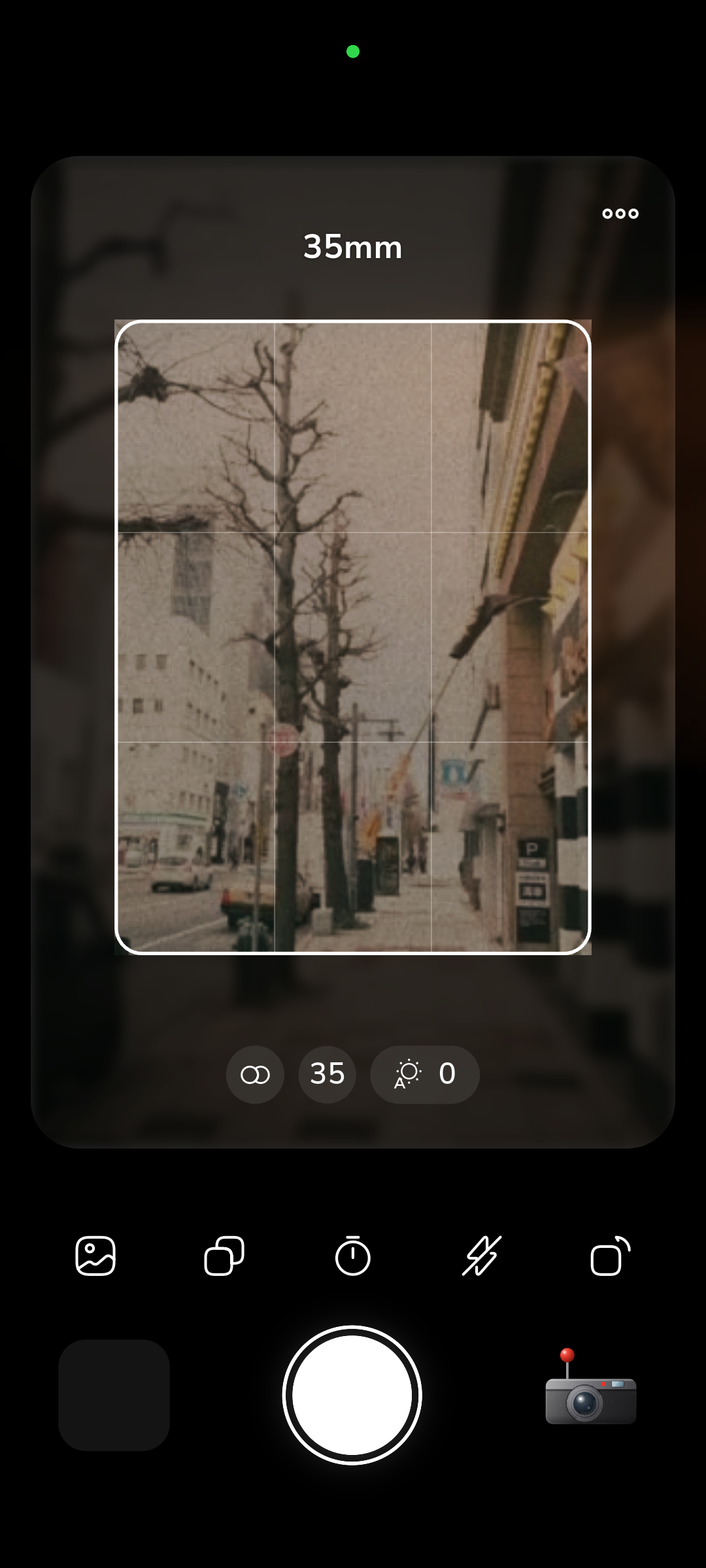
RfCamera's live viewfinder is built to replicate that same optical character rather than present a flat camera preview with a focus reticle drawn on top. The same pipeline that bakes the final JPEG, colour matrix transform plus the GLSL fragment shader in shaders/film.frag for barrel distortion and chromatic aberration, runs live on the preview feed in widgets/film_view.dart, so what you see through the on-screen viewfinder already carries the lens's optical signature: the same vignette falloff, the same edge softness, the same colour response the saved photo will have. You are composing against the actual rendered look of the simulated optics, not a neutral phone-camera feed with a filter promised for later, which means the framing decisions you make while looking at the screen are decisions made with full information about what the shot will actually look like.
The Sound of a Decision Being Made
Mechanical shutters make noise because moving metal curtains and springs can't be silent, but photographers came to rely on that noise as confirmation. The two-stage sound of a focal-plane shutter, a sharp click as the first curtain releases, then a second click a fraction of a second later as the second curtain closes the exposure, tells you unambiguously that the frame was taken and the mechanism has reset. Winding a film advance lever afterward produces a distinct ratcheting sound as the sprocket teeth pull the next frame into position and simultaneously re-cock the shutter spring, a sound that means the camera is now ready for the next shot and, just as importantly, that the previous frame is now sealed and can't be retaken by pressing the shutter again.
That sound carries weight a silent digital shutter doesn't: there's no preview screen to check, no delete button, no "are you sure" dialog. The click and the mechanical wind are the entire feedback loop, and their absence, a jammed shutter, a lever that doesn't move, is itself informative, telling you something failed before you waste the rest of the roll.
RfCamera reproduces these mechanical sounds per simulated camera body rather than using one generic shutter sound file across all twelve models, because a Leica-style rangefinder curtain and a folding camera's leaf shutter don't sound alike, and neither does a rewind crank versus a lever advance. The point of matching per-body acoustics isn't nostalgia for its own sake, it's that the sound is doing the same job it always did: telling you, without a screen, that the exposure just committed and that there is no way to undo it. Reintroducing that feedback in software is a deliberate constraint against the instant, consequence-free review a phone's default camera roll otherwise offers, where you can shoot the same frame ten times and delete nine without cost.
Designing With Constraints Instead of Options
A modern phone camera app can offer effectively unlimited combinations: any exposure value, any filter intensity, infinite undo, instant preview, instant deletion. RfCamera instead ships with twelve specific camera bodies, each with a fixed lens character, a fixed set of aperture and shutter stops, and a specific film stock personality baked into its colour matrix. That's a smaller design space by every measurable axis, and it's smaller on purpose. Constraint is what turns a tool into something you make decisions with, rather than a surface you keep adjusting until something looks acceptable. When there are only six aperture stops to choose from instead of a continuous range, choosing one is a real decision with real photographic consequences you can learn from shot to shot, not an approximation you'll nudge later anyway.
The same logic extends past the controls into the whole capture workflow. Because core/bake.dart replays the identical pipeline you already saw live in the viewfinder, running the same colour matrix and shader pass at full resolution inside a Dart compute() isolate, there's no separate "processing" step where the look might change from what you composed against. What you framed is what you get; there's no cloud re-render, no server-side model deciding the final grain pattern differently than the preview suggested. That determinism is itself a constraint: you can't hope a later processing pass will save a composition or exposure choice you got wrong, so the discipline has to happen at the moment you press the shutter, the same discipline a roll of physical film demanded when each frame cost money and couldn't be previewed at all.
None of this is about making the software harder to use for its own sake. It's about matching the interface's flexibility to the flexibility the underlying craft actually has. Film photography has never been a continuously adjustable medium, it's a series of discrete, physical decisions: this stock, this aperture, this shutter speed, this exact moment. Software that hides those seams behind an infinitely smooth slider isn't simplifying the craft, it's describing a different one.